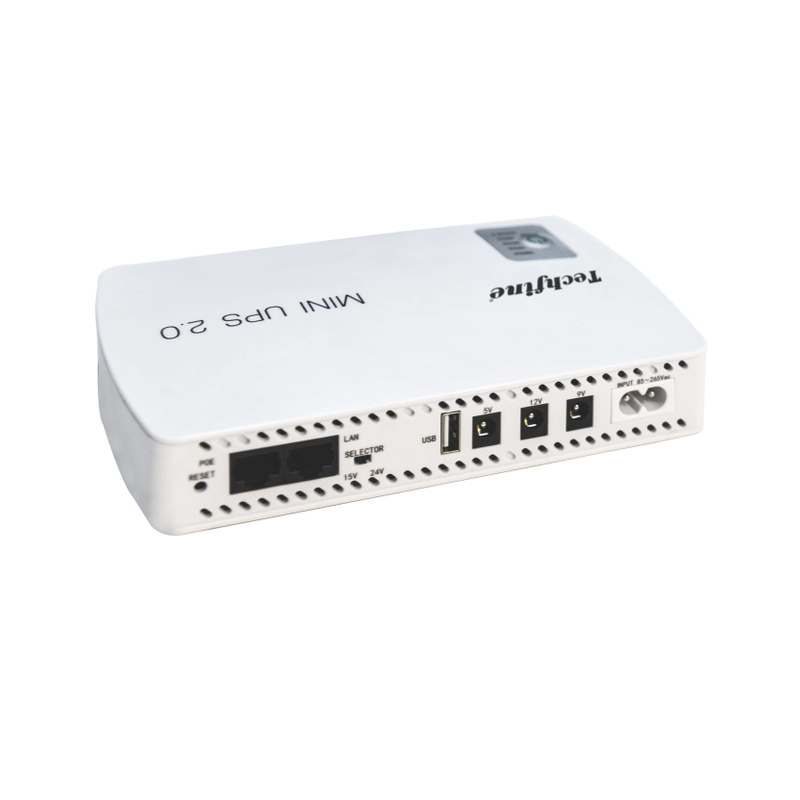
A mini DC UPS can keep a router or other small network device powered without first creating an AC supply for its adapter. Compatibility still requires more than a plug that fits. Match output voltage, connector polarity, current capability and the complete service chain. If Power over Ethernet is involved, verify its exact type rather than assuming every port labelled PoE supplies the same thing.
Inventory the devices that preserve the connection
Internet access can require an optical network terminal or modem, a router and possibly a separate switch or access point. Record which devices must remain powered at the premises. Backing up only the router may not preserve service if another necessary device loses its supply.
Also recognize the boundary of local backup. The internet provider’s equipment outside the premises may have its own power limitations. A DC UPS can support the approved connected devices; it cannot guarantee availability of the wider network. Define the objective as preserving local power rather than promising uninterrupted internet under every outage condition.
Read each device’s input requirement
Record the required DC voltage and permitted input conditions from the equipment documentation or label. A 5 V, 9 V and 12 V device must receive an appropriate supply; the values are not interchangeable because the connectors look similar. Confirm the required current or power capability as well.
The original adapter rating can help identify the required supply arrangement, but it is not necessarily the device’s actual continuous consumption. Keep maximum supply capability and measured operating demand separate. The first supports compatibility checks; the second can help assess runtime.
Check connector dimensions and polarity
Barrel connectors can differ in both dimensions and polarity. A lead that appears to insert correctly may not provide an approved connection. Request the correct supplied cable or adapter for the device and confirm the manufacturer’s requirements. Do not treat a collection of interchangeable tips as proof that every device is supported.
Avoid improvised polarity changes or repeated trial connections. An incorrect supply can damage equipment. Where the specification is unclear, ask the device and UPS suppliers to confirm the arrangement before use. Keep the approved lead associated with the relevant device during handover.
Budget individual ports and combined output
A multi-output UPS can have both per-port limits and a total output limit. Check both when supplying more than one device. A port being within its own current rating does not prove that all ports can operate at their maximum simultaneously.
For an illustrative load, a device drawing 12 V at 1 A requires 12 W, while another drawing 9 V at 1 A requires 9 W. Their combined demand is 21 W. That would exceed a hypothetical 18 W combined limit even if each individual port appeared suitable. These numbers explain the budget; they are not measured consumption or a recommended configuration for a Techfine product.
Treat PoE as a separate compatibility question
Power over Ethernet includes different arrangements. Ubiquiti’s PoE explanation distinguishes negotiated active PoE from fixed-voltage passive arrangements and warns that types can be incompatible. A voltage marking and an Ethernet socket do not establish support for every IEEE PoE-powered device.
Ask for the exact PoE type, voltage, power limit and connection arrangement supported by both devices. Do not assume a mini UPS’s 15 V or 24 V PoE option behaves like a standards-based network switch. Use the applicable datasheets and approved cables rather than relying on the short label alone.
Do not infer USB Power Delivery from connector shape
A USB-C connector can be used for a specific fixed output without providing every negotiated voltage associated with USB Power Delivery. Confirm the actual output specification and device requirement. A phone, router or other device requiring a particular charging protocol may need a different supported source.
Keep input and output ports clear as well. A connector intended to charge the UPS is not automatically an output for equipment. Follow the supplied instructions and label the approved arrangement where several similar cables are present.
Use a device compatibility worksheet
| Device | Supply details | Checks before acceptance |
|---|---|---|
| Modem or optical terminal | Required voltage, current and connector | Correct lead and stable operation |
| Router | Input requirements and actual duty | Port limit and combined-power budget |
| Access point or camera using PoE | Exact PoE type and power requirement | Supported negotiation or fixed-voltage arrangement |
| Other USB-powered device | Required voltage and protocol | Actual port capability, not connector appearance |
Include the total simultaneous demand and the intended runtime. Mark any unconfirmed item before purchase. A supplier can evaluate a complete device list more effectively than a request for a UPS that fits a router in general.
Assess runtime for the intended group
Request duration information for the exact model and realistic combined load. Battery capacity labels alone do not establish delivered output energy under every condition. Conversion consumption, battery condition and the connected demand influence the result.
Confirm the service behavior during the manufacturer’s approved transition test. Check whether each device stays operating and whether the local network service remains available. A power indicator staying on is not the same as verifying that a router or access point did not restart.
Compare the Techfine MINI M variants
The Techfine MINI M specification distinguishes 18 W, 36 W and 60 W versions with model-specific port ratings. It also identifies optional PoE outputs. Read the exact column and confirm the supplied version rather than combining the most favorable port values from different models.
Use the MINI M product page to begin the enquiry. Send device input details and the required duration. Ask for the complete approved cable and output arrangement with the quotation, including any optional function.
Frequently asked questions
Can I use 12 V for a device marked 9 V?
Do not assume so. Use only a supply within the device’s documented permitted input conditions.
Does a higher current rating force more current into the router?
A supply rating describes available capability, but voltage, polarity, connection and device compatibility still need to be correct. Confirm the complete arrangement.
Does backing up the router guarantee internet access?
No. Other local devices and the provider’s infrastructure may also be required.